Chapter 06 / 07
Define
Prepare an actionable defect draft with checked facts and provenance, then inspect the existing report without filing a duplicate.
What you should leave with
- Shared intuition
- Define preserves the evidence and our decision in a report someone else can act on.
- Shared language
- the finding is the tool's claim; the draft is our editable report; filed means the report and its tracking decision have been saved.
- Shared behavior
- fill the report with checked facts, retain its source, and inspect existing defects before filing another.
Find the fee finding
Define brings the tool finding, our explanation, and the decision about what happens
next into one place.
We’ll follow the fee finding from Task 1 into an editable defect draft.
The fixture already contains a report for this fee defect.
We’ll prepare the draft to show what we need to add, then inspect that existing report
instead of filing another copy.
Do: From the fixture root, run the command below.
Open http://localhost:3000/define/payments/findings.
Filter Source to Clean review and Task ID to 1.
Expand the finding beginning “capture() now floors the scheme fee instead of rounding
half up”. Use this wording and source to distinguish it from the older fee findings.
speed define feature payments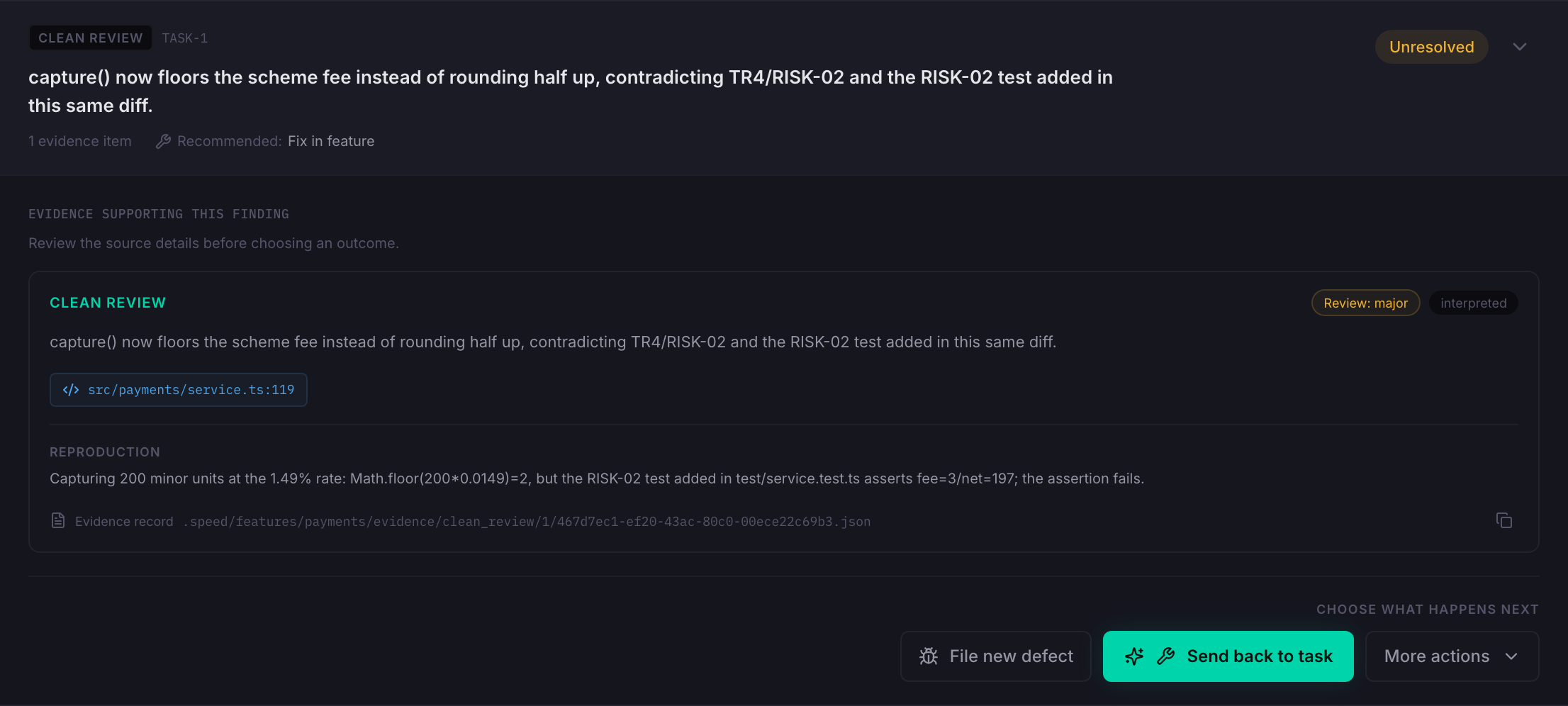
Actual Define UI, captured on 2026-09-29. This selected finding is Unresolved; the existing report shown later comes from an older finding for the same fee defect.
The top of the card identifies Clean review and Task 1.
Inside it are the reviewer’s claim, the service location, and a suggested reproduction.
We checked that reproduction ourselves.
The card’s text is still the review evidence; our separate test execution hasn’t been
automatically added to it.
Notice the two visible actions: File new defect and Send back to task.
The recommended action is to send the finding back to the feature task.
For this walkthrough we’re examining the defect-report route, because we need to
explain and track the fee regression separately from the retry work.
A recommendation doesn’t make that choice for us.
Do: In SPEED, show lib/cmd/define.sh, lines 11–29,
and lib/define_cli.py, lines 79–89.
Then show lib/defect_findings.py, lines 467–491 and 549–569.
The command reads the feature’s findings.
The reader combines tool evidence with saved decisions and returns each finding’s
source, status, and available actions.
That’s why this view can show more than the last review message.
The CLI can open an already-running dashboard; it doesn’t start one.
Inspect the generated draft
Do: Click File new defect on this fee finding. Inspect the initial form before entering anything.
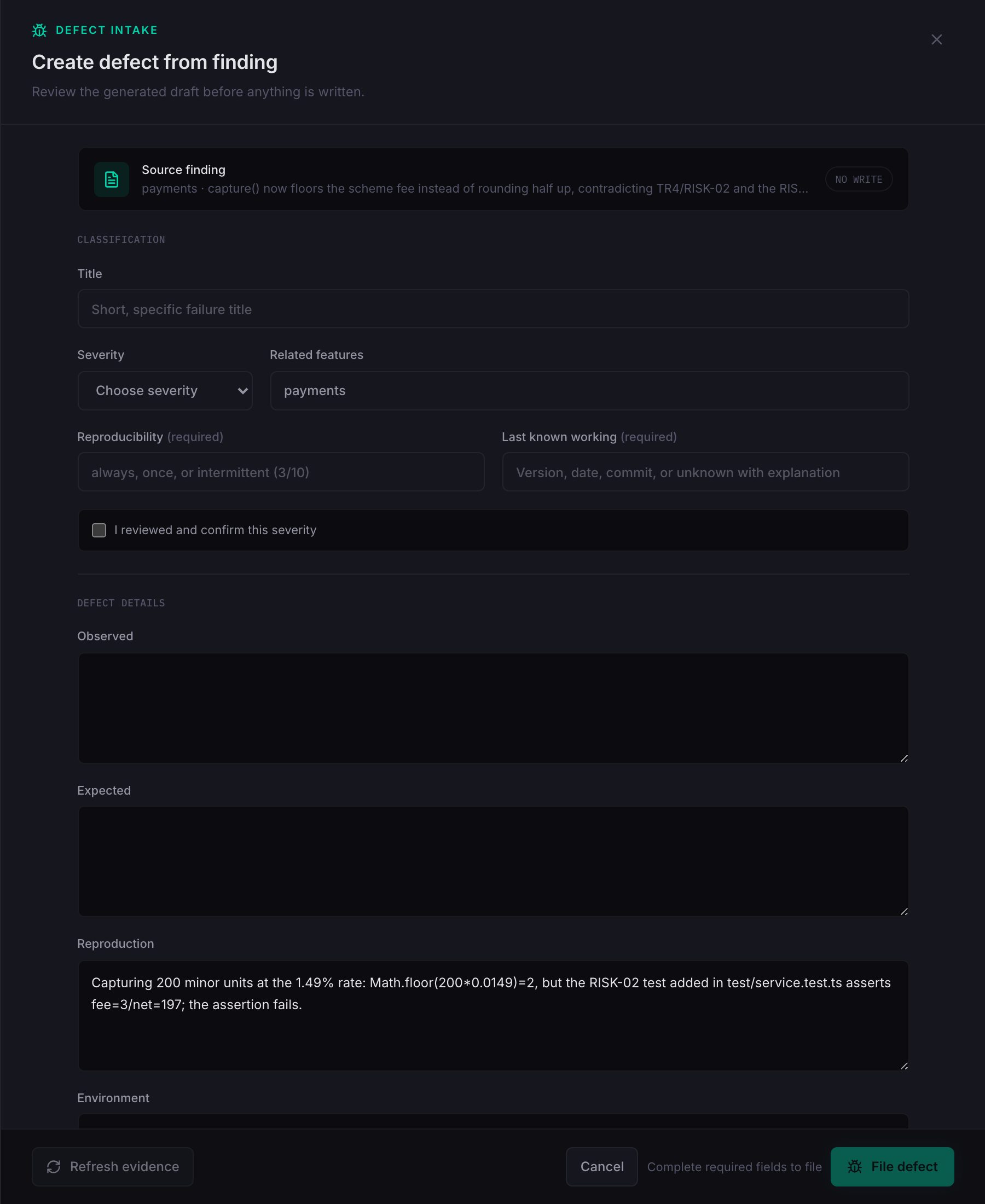
The form says NO WRITE.
Opening it has prepared a draft; it hasn’t created a defect.
The related feature is already payments, and Reproduction contains the reviewer’s
suggestion.
But Title, Severity, Observed, and Expected are empty.
Do: In SPEED, show lib/defect_intake.py, lines 125–161.
In the fixture, show
.speed/features/payments/evidence/clean_review/1/467d7ec1-ef20-43ac-80c0-00ece22c69b3.json,
lines 43–58: expected and observed are null; reproduction and summary contain text.
observed=_first_fact(evidence, "observed"),
expected=_first_fact(evidence, "expected"),
reproduction=_first_fact(evidence, "reproduction"),These assignments copy facts from matching evidence fields.
They don’t rewrite the review message into a complete report.
The title is also blank because this finding’s message exceeds the preview’s
hundred-character limit.
This is where the explanation we just worked through becomes useful: we supply the
observed behavior, required behavior, and evidence ourselves.
Write checked facts
Do: Enter the following values. The full copyable field values used in every draft screenshot are in fee-defect-draft.json. That file is lesson material, not a saved SPEED defect.
| Field | Text to enter |
|---|---|
| Title | Capture fee truncates instead of rounding half up |
| Severity | P1 |
| Related features | payments |
| Reproducibility | always |
| Last known working | Unknown at runtime; parent d08a680 uses applyRate, but was not tested. |
For this demonstration, P1 carries forward the reported severity on the existing
defect.
Review’s “major” label didn’t automatically become P1.
Confirming the form’s severity records our review of that choice; the one-unit example
by itself doesn’t establish production frequency or repair priority.
Always refers to the reproduced capture of 200.
The old calculation is visible in the parent commit, but we haven’t run that revision.
That’s why Last known working says unknown at runtime.
Do: Check I reviewed and confirm this severity for the demonstration draft.
Verify the existing report’s severity in fixture
specs/defects/capture-fee-truncates-instead-of-rounding-half-up.md, line 3.
For the history, run git show 965029f^:src/payments/service.ts:
line 118 in that historical file uses applyRate; the parent resolves to d08a680.
For Observed, enter the sentence we prepared:
Capturing 200 minor units records a scheme fee of 2 and a merchant amount of 198. The RISK-02 fee assertion fails: actual 2, expected 3.For Expected, include the requirement and both cases already in the regression test:
TR4 requires half-up rounding. For a capture of 200 minor units, record a fee of 3 and a merchant amount of 197. RISK-02 also requires fee 149 and merchant amount 9850 for a capture of 9999. Fee plus merchant amount must equal the capture.Do: Keep fixture specs/tech/payments.md, lines 42–43,
and test/service.test.ts, lines 107–115, beside these fields.
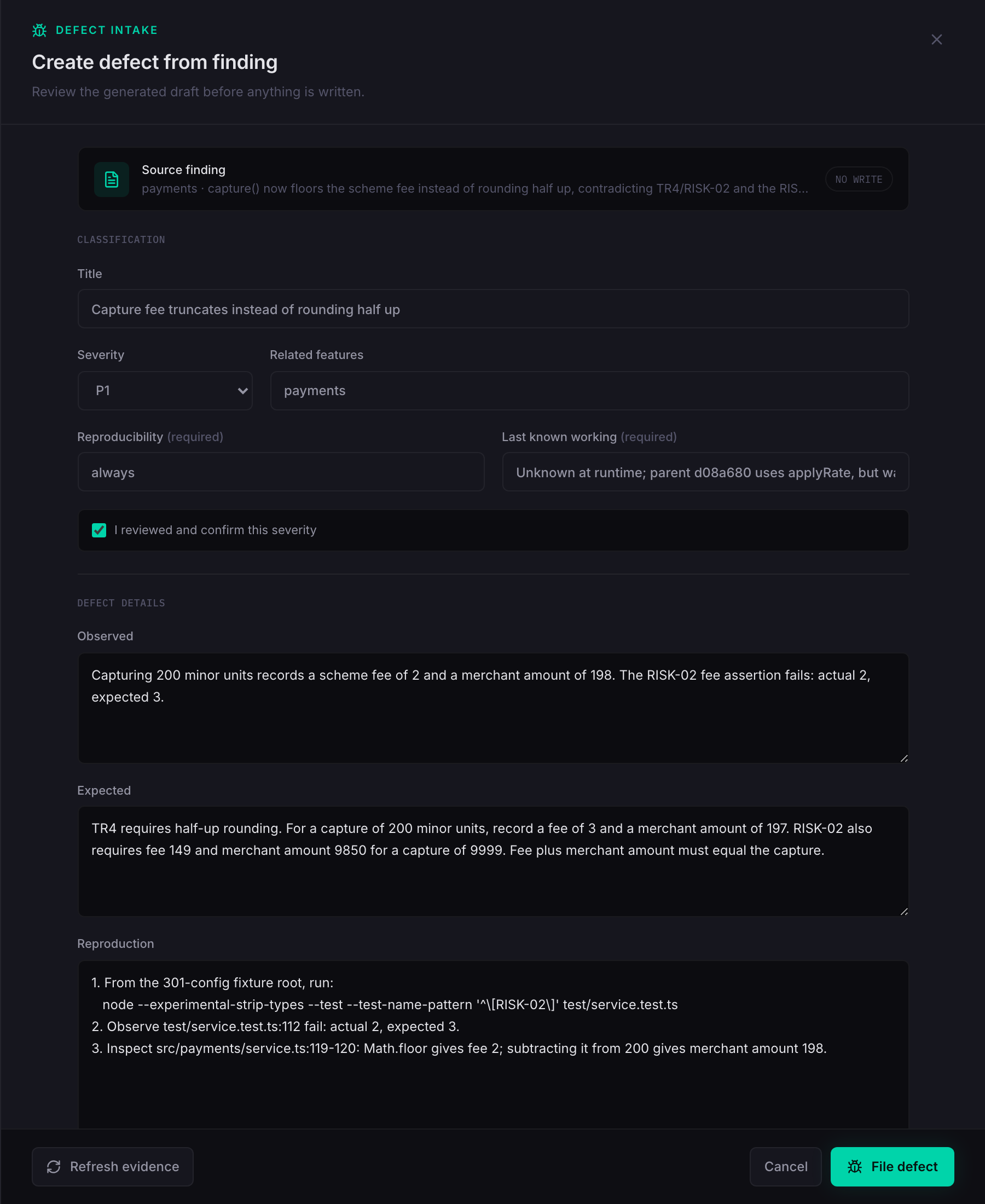
Now a reader can compare actual and required behavior without reconstructing the fee
calculation.
The second case is an expected result from the test; the failing run stopped at the
first case.
We haven’t described it as a second observed test failure.
Attach reproduction and impact
Do: Replace the generated Reproduction text with these numbered steps. Use real line breaks in the form.
1. From the 301-config fixture root, run:
   node --experimental-strip-types --test --test-name-pattern '^\[RISK-02\]' test/service.test.ts
2. Observe test/service.test.ts:112 fail: actual 2, expected 3.
3. Inspect src/payments/service.ts:119-120: Math.floor gives fee 2; subtracting it from 200 gives merchant amount 198.The reviewer’s suggestion described a case.
These steps tell another engineer exactly how to run it and where to look.
Environment records the checkout and runtime that produced the error.
Error Output keeps the actual failure available beside those steps.
Do: Enter Environment and Error Output from
fee-defect-draft.json.
The environment is the preparation run on 2026-09-29: round-0 at aa7cebc with an
uncommitted working tree, macOS on arm64, Node v26.9.0, and node:test.
The data comes from fixture test/fixtures/cards.ts, lines 8–16.
The screenshot contains an error excerpt; the complete captured output is
risk-02-output.txt, lines 1–30.
Refresh environment and output together if demonstrating a later run.
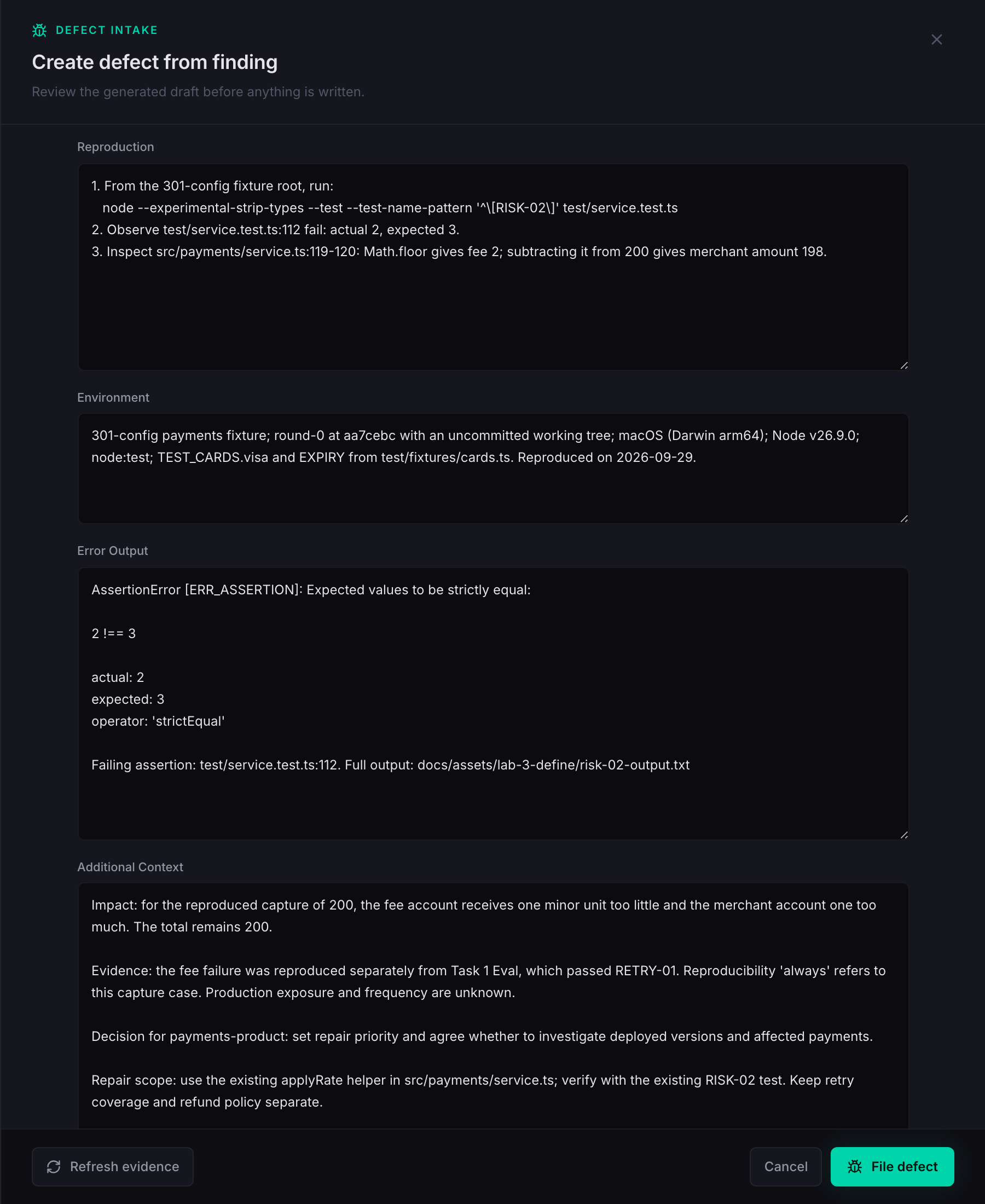
Additional Context is where we explain the consequence and ask for a decision.
Keep the source reference that Define already supplied, then add our checked impact,
what remains unknown, and the proposed repair scope.
Do: Enter Additional Context and Filing rationale from the field-values file. The added context is reproduced below; preserve the existing Selected evidence text after it, as shown in the screenshot.
Impact: for the reproduced capture of 200, the fee account receives one minor unit too little and the merchant account one too much. The total remains 200.

Evidence: the fee failure was reproduced separately from Task 1 Eval, which passed RETRY-01. Reproducibility 'always' refers to this capture case. Production exposure and frequency are unknown.

Decision for payments-product: set repair priority and agree whether to investigate deployed versions and affected payments.

Repair scope: use the existing applyRate helper in src/payments/service.ts; verify with the existing RISK-02 test. Keep retry coverage and refund policy separate.For Filing rationale, enter:
The existing rounding requirement and failing RISK-02 test establish a fee regression. Track this bounded repair separately from retry-helper coverage and the unresolved refund-idempotency policy.Do: For the proposed repair, verify fixture src/domain/money.ts, lines 38–45;
src/payments/service.ts, lines 118–120;
and test/service.test.ts, lines 107–115.
For the decision owner, verify specs/product/payments.md, line 3.
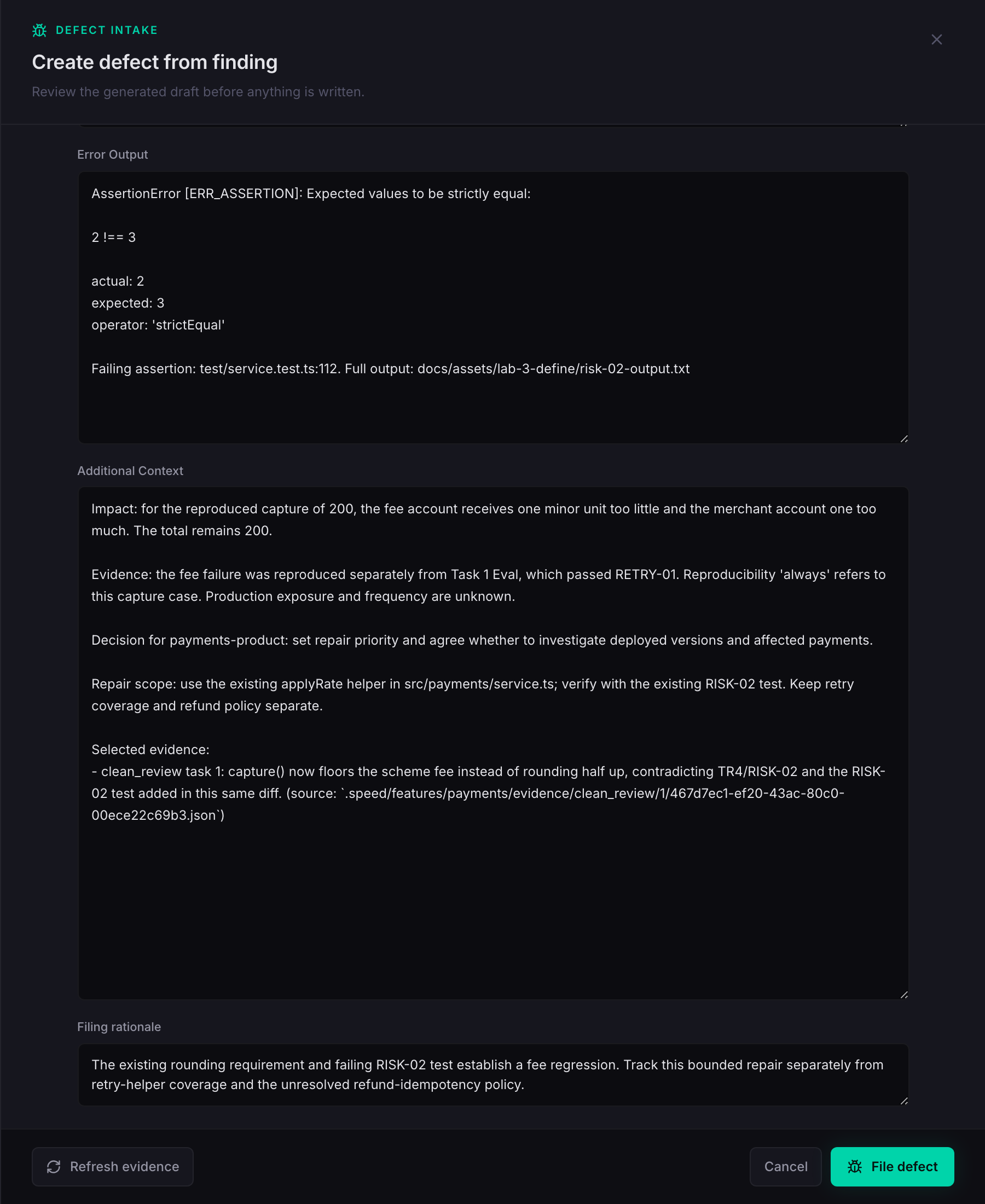
The report now tells the product manager which account receives the wrong amount and
what we need decided.
It tells an engineer how to reproduce the problem and which existing rule governs the
repair.
The source reference keeps both readers connected to the original Review finding.
Inspect the existing report
The File defect button is now enabled.
Before using it, look at what that action sends and what the backend checks.
Do: In SPEED, show
dashboard/frontend/app/define/[feature]/findings/page.tsx, lines 406–427,
and lib/defect_intake.py, lines 423–451.
The browser sends our edited fields together with the finding and evidence identifiers.
It also sends the versions of the evidence and decisions that we read.
The backend checks that those versions still match, validates the required fields,
and rejects a title already used by a defect.
So an enabled button means the browser has enough information to submit; it doesn’t
establish that this is a new issue.
In this fixture the fee defect already exists.
We won’t submit another report with the same title.
The initial preview didn’t show a duplicate warning because its generated title was
blank.
We checked the existing report ourselves.
Do: Click Cancel. Open the existing report at
http://localhost:3000/editor?spec=specs%2Fdefects%2Fcapture-fee-truncates-instead-of-rounding-half-up.md.
Keep the editor in preview mode.
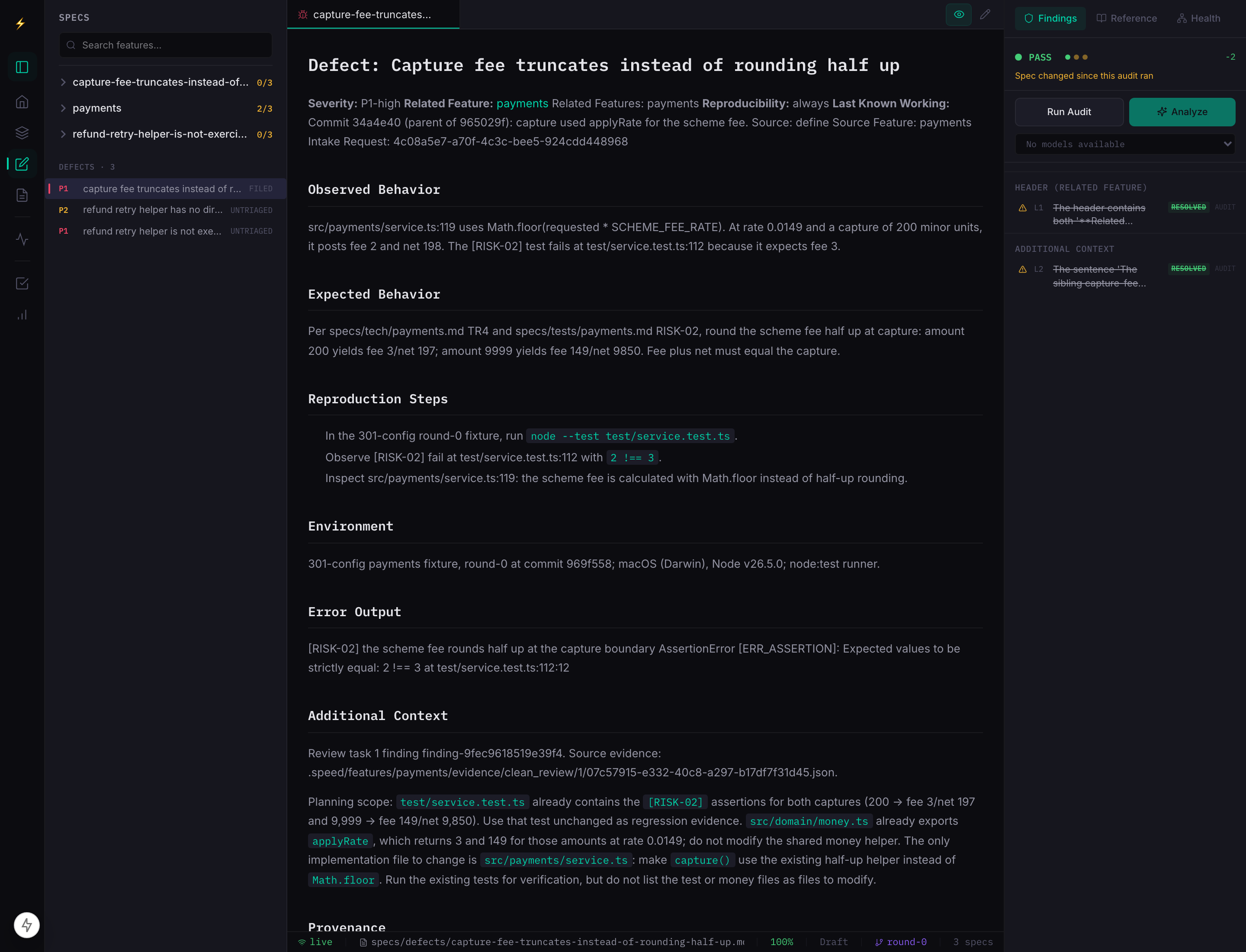
This is the existing filed report, not the draft we just cancelled.
It describes the same fee failure and already limits the repair to the service
calculation, using the existing helper and test.
Its environment and source finding belong to an earlier run.
Use the current reproduction we just prepared when discussing today’s evidence.
Do: Read fixture
specs/defects/capture-fee-truncates-instead-of-rounding-half-up.md, lines 12–24 and
39–48. Its source is the older finding finding-9fec9618519e39f4.
The screenshot draft used finding-5c661cea21154dd6, the current saved Review’s fee claim.
The report’s line 7 incorrectly names 34a4e40 as the parent; this checkout resolves
965029f^ to d08a680. Line 28 records an older environment.
These historical details were not changed to stage the demonstration.
To understand what filing persists, compare the report with its tracking record.
The report explains the problem.
The state records that it was filed and identifies its source finding and evidence.
Neither says the fee calculation has been repaired.
Do: Open fixture
.speed/defects/capture-fee-truncates-instead-of-rounding-half-up/state.json, lines
7–24, and
.speed/defects/capture-fee-truncates-instead-of-rounding-half-up/report.md, lines
12–24. In SPEED, show lib/defect_intake.py, lines 462–495 and 513–516,
then lines 326–348.
The filing code prepares the report, tracking state, and decision together, then
publishes them.
The decision retains which finding and evidence led to this defect.
That gives the next person a route back from the work we propose to the problem we
actually checked.
We’ll give Plan the existing report’s path next.
Its repair scope calls for the existing rounding helper and regression test.
That lets us judge the proposed work against a specific failure and a bounded repair.
Shared intuition: Define preserves the evidence and our decision in a report
someone else can act on.
Shared language: the finding is the tool’s claim; the draft is our editable report;
filed means the report and its tracking decision have been saved.
Shared behavior: fill the report with checked facts, retain its source, and inspect
existing defects before filing another.
Preparation and evidence notes
Presenter preparation: All six images are actual local UI captures from 2026-09-29, not mockups. The draft fields were entered and checked in the browser, then cancelled; no filing or other GraphQL mutation was sent. The current selected finding is unresolved, while the older fee report exists. The inbox also warns about incomplete intake transactions on other findings; this lesson neither repairs them nor presents the inbox as clean. Use the current source and wording if finding identifiers change. Capture provenance is in capture-manifest.json. The fee check was rerun and failed as shown. No fresh Review or full Eval was run for these captures. The source and screenshot checks do not constitute an aloud rehearsal. This remains a presenter demonstration, with no added learner exercise.
Carry forward
The existing fee report supplies a bounded repair. Filing records a decision and its evidence; it does not repair the calculation.
Help me reason through this
The generated title, observed, and expected fields are empty. Supply checked facts and inspect the existing fee defect before submitting.
Your explanation is saved in this browser.